

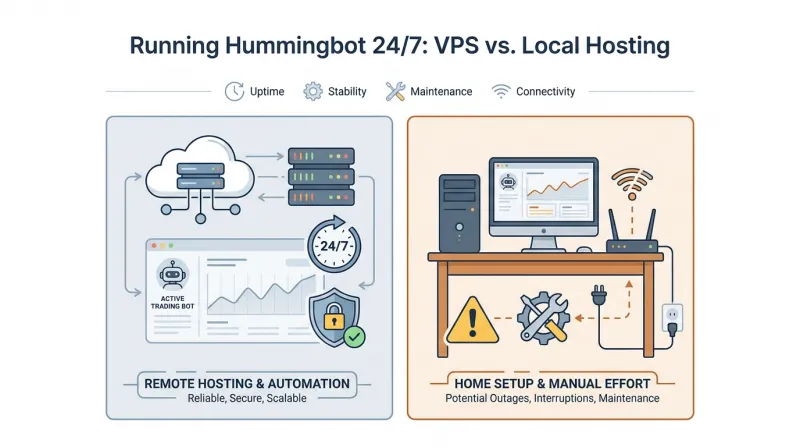
 Hummingbot needs a reliable place to run if you want it trading while you’re away from your computer. A VPS keeps it online independently of your home setup, so a local power cut or computer restart won’t stop the bot. This article compares local hosting with VPS hosting to help you decide which suits your needs, then covers what to look for if you choose a VPS.
What is Hummingbot?
Hummingbot is an open-source framework for building and running crypto trading bots. It’s written in Python and supports strategies for both centralized exchanges (CEXs) and decentralized exchanges (DEXs). The Hummingbot Foundation maintains the project, which individual traders and institutions use.
Developers can use Hummingbot to decide how a trading bot should buy and sell, then connect that bot to the crypto exchanges where it will trade. Hummingbot comes with three main tools to help manage those tasks:
-
Hummingbot Client, the core trading application
-
Hummingbot API, which lets other software interact with Hummingbot
-
Gateway, which connects Hummingbot to blockchain networks and decentralized exchanges for trading and wallet management.
Hummingbot is community-owned and licensed under Apache 2.0. The project reports more than 111,000 instances and 318 connectors, with $47 billion in aggregated trading volume since January 2025.
Why should you run Hummingbot 24/7?
Crypto markets operate around the clock. If Hummingbot runs only while you’re at your computer, it may miss market activity at other times. Running it continuously lets it check prices and place, update, or cancel orders according to your trading strategy’s rules.
This can matter for several types of strategies:
-
Market making
Hummingbot places buy and sell orders to capture trading spreads. Running it 24/7 keeps the strategy active, so orders can execute overnight or while you’re away from your computer. -
Arbitrage
Price differences between exchanges are often short-lived. With Hummingbot running, the strategy can detect and act on these opportunities at any time of day. -
Risk management
Some Hummingbot strategies support stop-loss controls to limit trading losses. Continuous operation lets these controls respond when market conditions reach predefined thresholds. -
Inventory management
Executed trades change the balance of assets you hold. When Hummingbot is running, inventory skew adjusts the size of future orders as trades change your asset balance, helping keep it closer to your target allocation. -
Hanging orders
When one side of a market-making order pair fills, Hummingbot can keep the opposite order active. Staying online lets the strategy monitor and manage that remaining order until it fills or meets a cancellation condition.
VPS vs. Local Hosting for Hummingbot: key factors to consider
Both a VPS and local hosting can run Hummingbot continuously. The choice depends on your needs for uptime, trading performance, security, cost, maintenance, and remote access.
1. Uptime
A VPS runs in a data center with backup power and redundant network infrastructure. That means your Hummingbot strategies can keep running even when your personal computer is switched off.
With local hosting, Hummingbot relies on your computer and home internet connection. A power outage or Wi-Fi disconnection can stop the bot. If your computer shuts down overnight, Hummingbot can’t monitor active orders or execute new trades until it starts again.
2. Trade execution latency
Hummingbot uses exchange APIs to receive market data and submit orders. Network latency is the time it takes for those requests to travel between Hummingbot and the exchange.
A VPS near an exchange’s API infrastructure can reduce network delays. This matters particularly for market-making and arbitrage strategies, where delayed order execution can affect trading results.
With local hosting, requests travel through your residential internet connection. Also, ISP routing and network congestion can add delays.
3. Security
Hummingbot uses exchange API credentials to access trading accounts and execute orders. Those credentials need protection wherever you run the bot.
A VPS gives Hummingbot a separate environment from your personal computer. You can also restrict access to the server with SSH authentication and firewall rules.
With local hosting, Hummingbot may share an operating system with your browser, downloaded applications, and other software. If the computer is compromised, attackers could expose the bot’s configuration and API credentials.
4. Resource availability
Hummingbot needs CPU and RAM to process market data, run trading strategies, and manage exchange connections. Those resources must remain available while the bot runs.
A VPS allocates virtual CPU and memory to your server instance. Hummingbot can run separately from applications on your personal computer, though performance may still be affected by contention on the physical host.
With local hosting, Hummingbot shares system resources with other applications. Resource-intensive development tools or games can use CPU and RAM that the bot needs.
5. Hosting costs
If you already own a suitable computer, local hosting doesn’t require a monthly server subscription. But leaving it on 24/7 increases electricity use and contributes to hardware wear.
A VPS has a recurring hosting charge. You don’t need to keep your personal computer powered on, and the provider maintains the underlying physical server hardware.
For development and occasional testing, local hosting is usually more economical. For continuous operation, compare the VPS subscription with your local electricity and hardware costs.
6. Maintenance
Wherever you run Hummingbot, you’ll need to keep the application and its dependencies up to date and check that your strategies are running as expected.
With local hosting, operating system updates or restarts can interrupt the bot. You may need to restart Hummingbot yourself after the computer comes back online.
A VPS gives you a separate environment for Hummingbot. You can schedule server updates around your trading activity and use Docker restart policies or system services to bring Hummingbot back online after a reboot. With a managed VPS, the provider can also handle server maintenance, such as operating system and security updates. You remain responsible for maintaining Hummingbot and its dependencies.
7. Remote access and management
With local hosting, remote access depends on your home computer staying powered on and connected to the internet. If it shuts down or loses its connection, you can’t reach Hummingbot until the computer is back online. You may also need to configure remote desktop or SSH access and secure it with a VPN or another method.
A VPS runs independently of your personal computer. You can connect to it through SSH to check logs, update configurations, or restart a trading instance. This makes it easier to manage Hummingbot when you’re away from your usual workstation.
Choosing a VPS for Hummingbot
Before choosing a provider, make sure its VPS meets Hummingbot’s requirements and supports how you plan to run it.
Compare providers and confirm that the VPS plan you choose offers the features below.
Sufficient CPU, RAM, and storage
Hummingbot’s installation guide lists a minimum of 1 vCPU, 4 GB RAM, and 5 GB storage per instance. Choose a VPS that meets these requirements, and allow for more resources if you plan to run multiple instances or other services.
Multiple data center locations
Choose a server location with good connectivity to the cryptocurrency exchanges you use. Providers with several locations give you more options.
Support network testing tools
Some VPS providers offer test IPs or Looking Glass pages for their data centers. These let you check network routes and latency from a particular server location. For example, Bacloud provides Looking Glass pages for different locations, such as the Netherlands and Chicago. Use the page for a location you’re considering to compare connectivity before choosing where to run Hummingbot.
DDoS protection and configurable firewalls
A DDoS attack sends a large volume of traffic to a server to disrupt its service. When comparing VPS providers, check whether they offer DDoS protection to filter that traffic. Also check whether you can set firewall rules to control which connections can reach your VPS.
Linux compatibility and administrative access
Make sure the VPS supports a Linux distribution compatible with Hummingbot’s Docker-based installation. You’ll also need administrative access to configure it.
Scalability
Running more Hummingbot instances uses more CPU, RAM, and storage. Check whether you can increase those resources on your current VPS or need to move to a new server.
Backup and recovery options
A snapshot or backup saves a copy of your server. If a system failure or configuration change causes issues, recovery tools can help you restore that copy.
Responsive technical support
Server or network issues can occur at any time. Check whether the provider offers 24/7 support and how quickly they respond.
Flexible billing options
Compare monthly and hourly plans. If you prefer to pay with cryptocurrency, check whether the provider accepts it.
Run Hummingbot with Bacloud VPS hosting
If you plan to run Hummingbot continuously, Bacloud offers VPS hosting options that let you deploy your trading bot on a remote server instead of keeping your personal computer running. With nearly 20 years of hosting experience, Bacloud provides Linux KVM, Linux VDS, Linux OpenVZ, Windows KVM, and Windows VDS servers.
You can choose from data centers in Lithuania, the Netherlands, Chicago (USA), and Coventry (UK), allowing you to host Hummingbot closer to your exchange’s API servers and potentially reduce network latency when submitting trading orders.
For running Hummingbot 24/7, Bacloud provides several useful features:
-
Performance - NVMe storage on KVM and VDS plans, with dedicated resources available on VDS.
-
Linux support - Ubuntu, Debian, CentOS, and AlmaLinux.
-
Reliability - 99.97% reported service uptime and 24/7 system monitoring.
-
Experience - 35,000+ customers and 57,000+ services delivered.
Sign up with Bacloud to choose a VPS for your Hummingbot trading bot.