
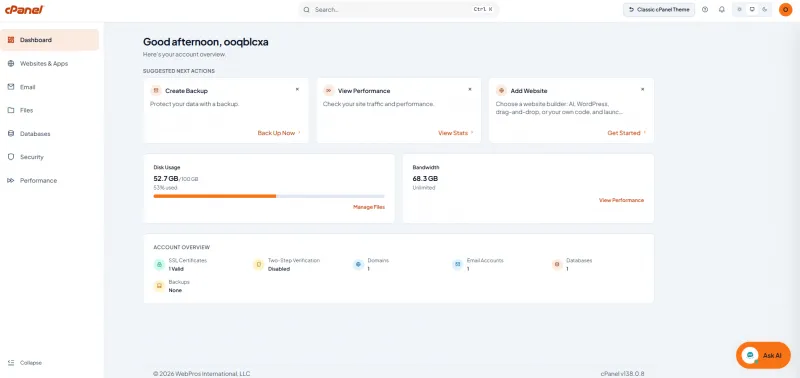
Meridian control panel, Bacloud.com
cPanel has been one of the most familiar web hosting control panels for decades, but familiarity can also become a limitation. As websites, applications, email, security tools, and deployment workflows have grown more complex, the traditional “collection of tools” approach has started to feel increasingly technical for users who simply want to get something done.
With cPanel & WHM version 138, cPanel is making one of its most visible changes in years. The headline feature is Meridian, a completely redesigned cPanel experience built around tasks rather than menus. But version 138 is much more than a new interface: it also introduces AI-assisted hosting features, easier domain management, modern Node.js application deployment, security changes, faster security updates, new APIs, and a series of improvements that have continued to arrive since the initial v138 release.
And for Bacloud customers, the most important part is simple: Meridian is already available in our cPanel hosting environment. Bacloud’s hosting services continue to use cPanel as the hosting control panel, while the new interface gives customers a more modern way to manage the same hosting resources they already rely on.
Bacloud offers fast and reliable shared hosting with LiteSpeed technology—perfect for WordPress websites. Enjoy fast loading speeds, security, and easy management. Get started today with Bacloud!
cPanel is changing more than its look
Calling Meridian a “new cPanel theme” does not really describe what has changed.
The familiar Jupiter interface is primarily organized around individual features. Meridian starts from a different question: what are you trying to accomplish?
Instead of presenting a long collection of tools, Meridian groups hosting management into six main areas: Websites, Email, Files, Databases, Security, and Performance. The new dashboard then surfaces information that deserves attention, including account status, resource usage, security information, required actions, and suggested next steps.
That change matters because most hosting customers do not think in terms of individual cPanel modules. They think in terms of outcomes: add a website, create an email address, check an SSL certificate, manage a database, restore files, or find out why something is not working.
Meridian is designed around that behavior. Website-related functions such as domains, DNS, SSL/TLS, WordPress and Sitejet are brought closer together, while email accounts, forwarders, filtering and other mail functions have their own focused workspace. Security and performance information also become much easier to surface without searching through unrelated menus.
The dashboard itself is more useful than a simple launcher. cPanel has introduced Action Required and Suggested Next Actions areas, along with resource and account information, so the interface can point out issues rather than waiting for the user to discover them. Meridian also includes a command palette for quickly finding features and supports light and dark appearance modes.
For new hosting accounts, Meridian goes further with a guided setup flow covering a domain, website and email. Website deployment can involve WordPress, Sitejet Builder, uploaded site files, or a Node.js application from Git or a ZIP archive. cPanel says the onboarding experience was designed to take a new account from its first login to a published website in under ten minutes.
Importantly, Meridian does not replace the underlying cPanel platform. It uses the same account data, configuration and APIs as the established Jupiter interface. Jupiter also remains supported, which helps experienced users who prefer the classic cPanel workflow or need less-used administration tools. Existing accounts with Jupiter access can move between interfaces when theme switching is enabled; newer Meridian-only accounts have more restrictive switch-back rules unless an administrator changes their theme.
In other words, the change is primarily about how hosting is presented and managed—not a migration of customers’ websites, databases, or email to a different hosting system.
AI becomes part of the hosting workflow
Version 138 is also the release in which cPanel began turning AI from an external tool into part of the hosting workflow itself.
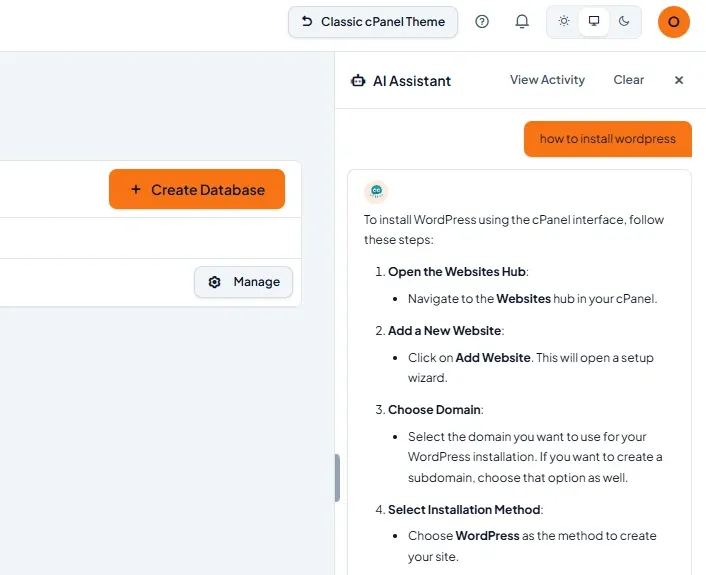
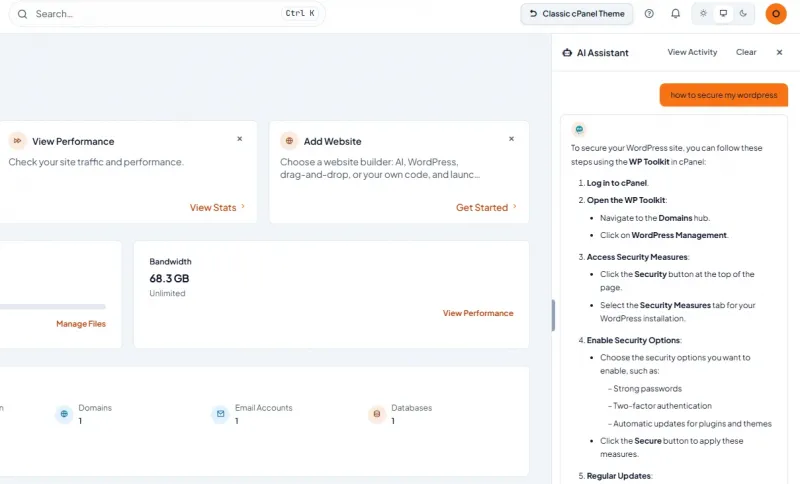
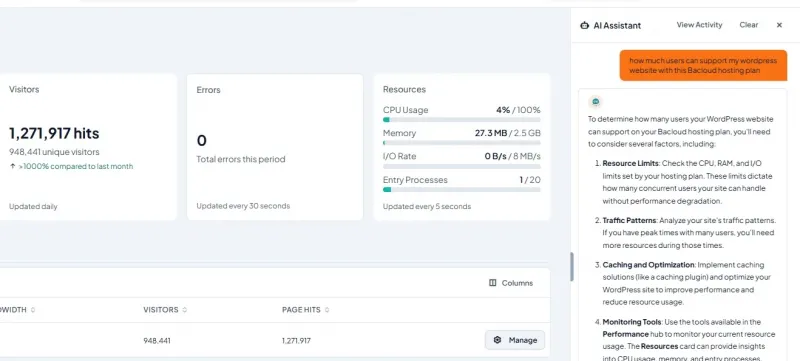
The most visible example is the cPanel AI Assistant, which is integrated into Meridian. It can answer hosting-related questions in context, recognize the part of cPanel a user is currently working in and use account information such as domains, email accounts, databases, disk quota, SSL status and AutoSSL logs when helping diagnose problems. When the hosting provider enables the necessary capability, the assistant can also propose certain account changes, with user approval required before it acts.
 AI Assistant, Bacloud.com
This is more interesting than simply placing a generic chatbot inside a control panel. cPanel is building the assistant around actual hosting context. For example, a question about SSL while working with a particular domain can be handled with knowledge of that account rather than only general documentation. cPanel has continued improving this capability since v138 launched, including better handling of non-English characters, stronger server-generated passwords for newly created accounts and improved approval workflows for actions that modify an account.
 AI Assistant, Bacloud.com
Another major addition is AI App Hosting. Modern AI coding platforms can generate surprisingly complete Node.js applications, but generating code and operating that application on a production server are two different problems. cPanel is attempting to close that gap by giving Node.js applications a more direct deployment path into a hosting account. Projects can be deployed from supported source packages and Git repositories, while cPanel handles the application environment and container-based runtime.
That feature has already evolved beyond its first v138 implementation. September updates added better Git-over-SSH assistance, support for passphrase-protected SSH keys, improved detection of Node.js build output directories and the ability to serve an application on a domain already associated with the hosting account. A later update made Production and Development run modes apply immediately to the running container.
 AI Assistant, Bacloud.com
cPanel is also integrating Nova and Nova for WordPress, which turn natural-language descriptions into websites or applications. Nova for WordPress creates a WordPress-based site rather than locking the result into a proprietary editor, while Sitejet AI can create an editable website draft from a short description and continue the normal editing process in Sitejet Builder. cPanel currently treats parts of this AI ecosystem as provider-controlled or partner functionality, so availability can vary by hosting package and provider.
Another, more technical piece of the AI strategy is support for the Model Context Protocol, or MCP. It is intended to let compatible AI clients interact with hosting resources using scoped permissions rather than giving an AI tool unrestricted server access. cPanel describes the integration as a way for AI tools to work with hosting accounts while remaining bounded by account permissions and product controls.
Meridian is included with cPanel v138 without a separate Meridian license, but that shouldn't be confused with a promise that every AI function is automatically active on every hosting account. cPanel explicitly notes that AI availability depends on the hosting provider, enabled features and rollout conditions.
Version 138 brings practical upgrades beyond Meridian
Some of the most useful improvements in cPanel 138 have nothing to do with the visual redesign.
One of them is surprisingly basic but long overdue: domains can now be renamed directly through cPanel. Version 138 adds support for renaming primary domains, addon domains and aliases/parked domains. For customers changing a brand, correcting an incorrectly configured domain, or reorganizing a hosting account, this can eliminate a process that previously often required more manual intervention. cPanel also added a corresponding Domain::rename_domain UAPI function for automation and integrations.
There is also a new Domain Recommendations & Purchase framework. It can integrate cPanel with a provider’s WHMCS domain store and return domain availability, alternatives, pricing and checkout information. The feature is still marked experimental in v138 and is currently associated with the Jupiter interface, so it is better viewed as a foundation for tighter hosting-and-domain integration than as a universal feature available on every account today.
For hosting infrastructure operators, cPanel introduced the WebPros Dashboard plugin, allowing cPanel & WHM servers to connect to the WebPros Dashboard for centralized visibility into multiple servers, websites, alerts and tools. The plugin replaces the older console-based installer approach and was also backported to cPanel versions 134 and 136.
Mail administrators also received a useful addition. WHM’s Exim Configuration Manager can now define what Exim should do when SpamAssassin identifies forwarded mail as spam. Forwarding spam is not only an inbox problem; it can affect the reputation of the server that forwards the message. Giving administrators an explicit policy for that traffic provides more control over email handling and deliverability.
For developers and hosting automation, v138 substantially expands the API surface. In addition to domain renaming, new functions can change document roots, inspect PHP error logs, query domain recommendations and obtain checkout information. WHM API 1 also adds a function to change the primary domain document root.
PHP troubleshooting is particularly noteworthy because the new LogManager API functions can list PHP error logs and read the latest entries for domains owned by the current cPanel user. It is the kind of relatively small platform change that can become valuable for custom management tools, support automation and future AI-assisted diagnostics.
cPanel 138 also introduces a new mechanism for reissuing shorter-term SSL certificates purchased through the cPanel Store, and cPanel backported the associated reissue script to all supported cPanel & WHM versions.
Security and maintenance are moving faster
The v138 cycle also contains several changes that customers may never notice visually but that matter considerably in production hosting.
One significant security change is that HTTP Basic authentication to the cPanel interface is now disabled by default. cPanel recommends API tokens for scripted calls instead. The change applies to the cPanel interface on ports 2082 and 2083 and does not apply in the same way to WHM, Webmail or Web Disk.
WebPros single sign-on has also moved to Proof Key for Code Exchange, or PKCE, rather than relying on a client secret. Existing linked WebPros accounts may need to authenticate again after the change.
Another improvement is considerably less visible but arguably more important: cPanel says expedited package security updates can now be applied within the hour instead of waiting for the next daily update cycle. For hosting infrastructure exposed continuously to the public internet, shortening the gap between an available security package and deployment is a meaningful operational improvement.
And version 138 has not stood still since its initial release.
The September v138 changelog shows multiple security-hardening and targeted-security releases. Version 138.0.6 updated bundled Exim to 4.100, Dovecot to 2.4.5, and Roundcube to 1.6.19, with the Roundcube update addressing an upstream security advisory. It also fixed several account-transfer, authentication and Meridian-related issues. Version 138.0.7 updated bundled PHP to 8.4.25, while cPanel 138.0.8, released on September 22, is listed as a targeted security release.
The surrounding cPanel software stack has also been moving. Recent EasyApache releases have delivered PHP, Node.js, nginx and security-related package updates, while Sitejet Builder received both faster publishing for large sites and a later security update. EasyApache 4 version 25.83 updated EA PHP 8.4 to 8.4.25 and EA PHP 8.5 to 8.5.10.
Meridian itself is also being updated independently of the main cPanel version. Meridian 1.3.5 corrected SSL certificate reporting, API-token expiration information, FTP account deletion behavior, and application deployment status, while also refining its interaction with the AI Assistant and Nova for WordPress.
That distinction is important. Meridian isn't a static interface delivered once with cPanel 138. cPanel is treating it, the AI Assistant and AI App Hosting as components that can continue evolving during the v138 lifecycle.
Power your blockchain projects with high-performance dedicated servers tailored for the cryptocurrency ecosystem. Whether running full nodes, validator nodes, mining software, trading platforms, or DeFi applications, Bacloud offers customizable server solutions built for stability and speed.
With powerful Intel Xeon or AMD EPYC processors, extensive memory options, and ultra-fast NVMe storage, our dedicated servers ensure your crypto infrastructure runs efficiently and securely. Full root access gives you complete service control.
Meridian is already available at Bacloud
For Bacloud customers, cPanel 138 represents a bigger change than a typical control-panel update.
We have already made the Meridian experience available in the Bacloud cPanel hosting environment, giving customers access to cPanel’s new generation of hosting management while retaining the underlying platform and tools they already know.
Bacloud continues to offer cPanel-based shared hosting, including NVMe hosting plans built around cPanel and LiteSpeed Enterprise. The arrival of Meridian changes the management experience rather than the websites themselves: domains, files, email accounts and databases remain part of the same cPanel hosting account.
For experienced cPanel users, Jupiter remains relevant. For someone launching a new website, managing several domains, or simply trying to find the right setting without memorizing cPanel’s traditional structure, Meridian will likely feel much more natural. And as cPanel develops its AI Assistant, app hosting, Sitejet AI, Nova and MCP integrations, Meridian is clearly intended to become the place where traditional shared hosting and newer AI-assisted development workflows meet.
That may ultimately be the most important part of cPanel 138.
The new design is the first thing users will notice, but the bigger story is what is happening underneath: easier domain management, more direct application deployment, tighter security defaults, faster security servicing, expanded APIs, and the beginnings of an AI-aware hosting platform.
For a control panel that has spent years being known primarily as the familiar way to manage files, email, databases and domains, Meridian marks a clear change in direction. cPanel is no longer only reorganizing existing hosting tools. It is trying to reduce the distance between having an idea, building a website or application, deploying it, and managing it afterward.
And that new cPanel experience has now arrived at Bacloud.