

 A domain name is one of the basic parts of any website. It is the address people type into their browser, such as
 example.com, to visit a website.
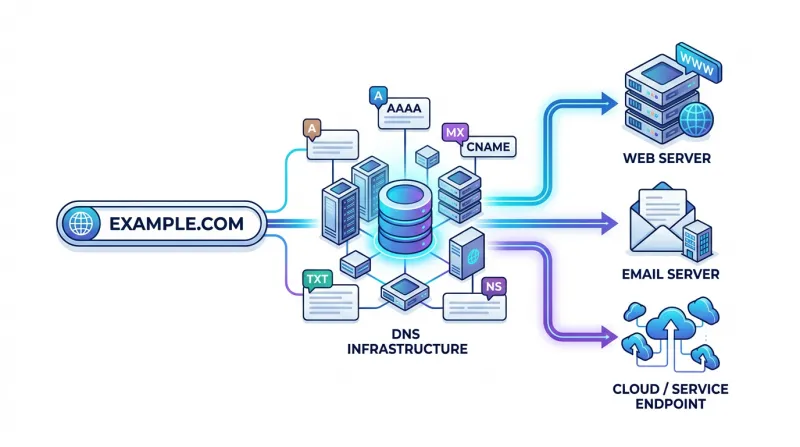
However, a domain itself does not contain a website. It needs to be connected to a web server, email service, or other online services. The Domain Name System, better known as DNS, manages this connection.
You do not need to be a system administrator to understand DNS. Knowing a few basic concepts is usually enough to manage your domain and avoid common problems.
What Is a Domain Name?
A domain name is simply an easy-to-remember address used instead of a numerical IP address.
For example:
example.com
is much easier to remember than a server IP address such as:
192.0.2.10
When someone enters a domain into a browser, DNS helps find the server associated with that domain and directs the visitor to the correct website.
The domain itself is normally registered through a domain registrar. From your registrar account, you can renew the domain, change its nameservers, manage ownership details, or transfer the domain to another provider.
Looking for the perfect domain for your next website? ????
Bacloud offers a wide selection of domain extensions together with reliable hosting solutions. Get your Domain + Hosting in one place and launch your new website with everything you need.
Find your domain. Choose your hosting. Start building.
What Is DNS?
DNS stands for Domain Name System.
Think of DNS as the Internet's address book. It connects domain names with servers and services.
For example, DNS can tell the Internet:
- which server hosts your website;
- which server receives your email;
- where a particular subdomain should point;
- which third-party services can use or verify your domain.
Without DNS, users would often need to remember IP addresses instead of domain names.
What Are DNS Servers?
DNS servers, often called nameservers, store or provide information about your domain's DNS records.
A domain normally has nameservers such as:
ns1.example-dns.comns2.example-dns.com
These nameservers tell the Internet where to look for information about your domain.
For example, if you register your domain with one company but host it with another, you may use the hosting company's nameservers. You can then manage DNS records through your hosting provider.
Changing nameservers is therefore important. If the new DNS provider doesn't include the correct website and email records, your website or email may stop working.
What Are DNS Records?
DNS records are individual instructions that tell the Internet what should happen with your domain.
There are many types of DNS records, but most website owners will mainly encounter a few common ones.
A Record
An A record connects a domain or subdomain to an IPv4 address.
For example:
example.com → 192.0.2.10
This is one of the most common ways to connect a domain to a web hosting server.
AAAA Record
An AAAA record works similarly to an A record but points to an IPv6 address instead of IPv4.
Not every website owner will need to manage AAAA records manually, but they are becoming increasingly common as IPv6 usage grows.
CNAME Record
A CNAME record points one hostname to another hostname.
For example:
www.example.com → example.com
Instead of assigning another IP address to www.example.com, the CNAME record tells it to follow another domain name.
CNAME records are also commonly used when connecting external services to a domain.
MX Record
An MX record controls where email sent to your domain should be delivered.
If you use an email provider such as Google Workspace, Microsoft 365, or another mail service, they will normally provide the MX records you need to add to your DNS settings.
Changing or deleting MX records incorrectly can prevent your domain from receiving email.
TXT Record
A TXT record stores text information connected to a domain.
TXT records are commonly used for:
- domain ownership verification;
- SPF email configuration;
- DKIM;
- DMARC;
- verification for services such as Google or Microsoft.
When a service asks you to add a TXT record, it will usually provide the exact value to copy into your DNS settings.
NS Record
An NS record identifies the nameservers responsible for a domain or DNS zone.
In everyday domain management, you usually configure nameservers through the domain registrar rather than editing them manually in the DNS zone.
What Is DNS Propagation?
DNS changes do not always become visible everywhere immediately.
Internet providers and DNS resolvers temporarily cache DNS information. As a result, some users may see the new DNS settings while others still see the old ones.
This process is commonly called DNS propagation.
Many DNS changes become visible relatively quickly, but in some situations it can take several hours. Nameserver changes may take around 24–48 hours to become visible everywhere.
What Is TTL?
DNS records normally contain a setting called TTL, or Time to Live.
TTL tells DNS systems how long they may keep a copy of a DNS record before checking for a newer version.
For most ordinary domain owners, there is usually no reason to change TTL values unless a hosting or DNS provider specifically recommends it.
How to Manage a Domain Safely
Most domain management is relatively simple, but you should still make DNS changes carefully.
Before modifying records, check which company currently manages your DNS. Your domain registrar, hosting provider, and DNS provider may all be different companies.
When connecting a new service, use the exact DNS values it provides. Avoid deleting existing MX, TXT, or other records unless you know what they do.
It is also a good idea to keep your domain account secure. Enable two-factor authentication where available, keep your contact details updated, and consider automatic domain renewal so an important domain doesn't expire accidentally.
Domain, Hosting, and DNS Are Different Things
One common source of confusion is that a domain, hosting, and DNS are separate services.
The domain is your Internet address.
The hosting server stores your website.
DNS connects the domain to the hosting server, email provider, and other services.
They may all come from the same company, but they don't have to.
For example, you could register your domain with one provider, host your website with another company, and use a third company for DNS management.
Conclusion
DNS may look complicated at first, but most domain owners only need to understand a few basic concepts.
A domain gives your website an easy-to-remember address, DNS tells the Internet where that domain should point, and DNS records define where your website, email, and other services are located.
The most important records to recognize are A, AAAA, CNAME, MX, TXT, and NS. Understanding what these records do makes it much easier to connect a domain to hosting, configure email, verify online services, or move a website between providers.
And when changing DNS settings, always check the existing configuration first. A small DNS change can affect not only your website but also email and other services connected to the domain.