

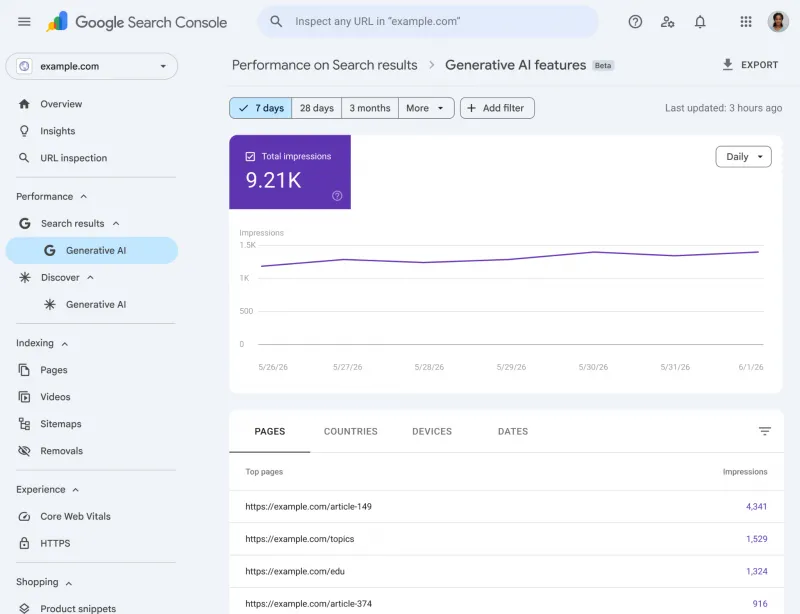
Google has launched new Search Generative AI performance reports in Search Console to show how your content appears in Google’s AI-powered search features. These dedicated reports (for Search and Discover) track impressions for generative AI answer features such as AI Overviews and AI Mode. Unlike classic Search Console reports, the new reports focus on visibility in AI search results (impressions, pages, countries, devices, and dates) and do not include clicks or average position metrics. The rollout is limited (initially for a subset of sites in the UK) and site owners can even opt out of AI features if desired.
Google’s announcement makes clear that site owners will now get insights into generative AI features. The new reports give “dedicated views of your impressions within generative AI features on Search, such as AI Overviews and AI Mode, as well as generative AI features in Discover”. In other words, you’ll see when Google’s AI answer boxes or chat-style results cite your pages. This data was already included in the overall Performance report, but now it has its own separate dashboard. The idea is to help you understand and measure your AI-driven visibility separately from regular search traffic.
Source: Google.com
What the Generative AI Performance Reports Show
In Search Console’s Search Generative AI and Discover Generative AI reports, you get a breakdown of where and how often your site was shown in Google’s generative answer features. The key data points include:
- Impressions: How many times did links from your site appear as citations or answers in Google’s AI features (Search and Discover)? Every time Google’s AI generates an answer that pulls content from your site, that counts as an impression.
- Pages: Which specific URLs from your site were used in those AI-generated answers? This helps you see which pages are fueling the AI responses.
- Countries: The geographic locations where your content was shown in AI answers. Useful for international SEO insights.
- Devices: (Search only) Whether the AI features appeared on desktop, mobile, or tablet devices when your content was cited.
- Dates: Trend data over time (hourly, daily, weekly, monthly), so you can track whether AI impressions are growing or shrinking.
These dimensions let you slice the data by page, country, device, or time period, just like the classic Performance report. For example, you can filter to view your top pages in AI answers or to see whether AI visibility is concentrated in certain countries.
Note: The new reports count only impressions. There are no click-through (CTR) metrics in this view. If someone reads a Google AI answer and doesn’t click your site, that impression is still counted (but no click is recorded). Google confirms the first version is limited to impressions (no click data). This reflects the nature of AI answers: a user might get the information directly from the answer box without clicking any link.
How It Differs from the Classic Performance Report
The Generative AI report is different from the traditional Search Console Performance report in a few important ways (see the table below for a comparison):
- Data Focus: The classic report covers all search results (web, images, news, etc.) and provides clicks, impressions, CTR and average position for your site on Google Search. The new Generative AI report covers only Google’s AI-driven features (AI Overviews, AI Mode, Discover AI) and provides only impression-based metrics. It’s a visibility report, not an engagement report.
- Metrics: Classic reports include clicks, CTR, and position by default. The AI report does not include clicks or positions (these aren’t available for AI answers). Instead, it shows how often your content is cited by the AI, which pages are cited, and basic breakdowns by country/device/date.
- Use Cases: Use the classic report to track keyword performance, organic clicks and rankings. Use the Generative AI report to understand which pages Google is using in AI answers and to separate your “AI impressions” from regular traffic. It essentially treats AI features as a new channel to measure.
- Limitations: The Generative AI report is new and still limited – only a subset of sites see it initially, query data may be limited, and it only shows impressions. Classic reports are mature and global, but focus only on standard search.
Where to Find the Reports in Search Console
Once available to you, the Generative AI reports appear in the Performance section of Search Console. In the new interface, there will be separate tabs or filters for Search generative AI and Discover generative AI (in addition to the regular Search and Discover performance reports). If you don’t see a “Generative AI” option yet, it may not be rolled out to your property. Google notes that not every site has access immediately – they are "rolling out this report to a subset of website owners" first.
To check, open Search Console, go to Performance, and look for a dropdown or filter for “Search generative AI” (and another for “Discover generative AI”). The help documentation also has a direct link icon that opens the report (search.google.com/search-console/performance/…/ai), but you must be signed in to see it.
Rollout, Eligibility, and Controls
Rollout: At launch (June 2026), the Generative AI reports are limited. Google says they are being tested on a “subset” of sites before a wider release. According to industry news, the first wave is in the UK, with a global rollout planned later. If you have a Search Console property for a large or active site, keep checking – you may get it soon. Bing’s webmaster tools already have a similar report, and Google appears cautious in rolling out slowly.
Eligibility: Even if the feature is live, your site must have enough generative AI traffic to show data. If your site has seen few or no impressions in AI features, you won’t see a graph. The help page notes: “Your site hasn’t received enough impressions in generative AI features” is one reason you might not see the report. Also, the Search Console documentation warns that if you have excluded your site from AI features (see below), it won’t appear in those features.
Privacy / Attribution Controls: Google is also introducing a new opt-out toggle in Search Console for AI features. This means you can choose not to have your site’s content used in generative AI answers. If your site opts out via this toggle, Google will not show your pages in AI Overviews, AI Mode, or Discover AI, and you’ll lose all AI impressions. However, Google emphasizes that opting out will not affect your normal organic rankings; it simply cuts off the AI channel. (This toggle was introduced in response to publisher concerns and regulatory pressure in regions like the EU. Currently it’s only available to certain owners in the UK, with broader availability coming later.)
In practice, if you’re not comfortable with your content being used to “ground” AI answers, this toggle lets you control it. Otherwise, by default, your content will continue to be used as before, but now you can at least track those uses via the new reports.
Practical Implications and Best Practices
Why this matters: Generative AI features are a new way that people see your content on Google. Unlike a normal search result that leads to a click, AI Overviews and chat mode may deliver answers directly on Google’s page. For SEOs and publishers, that means some traffic or brand impressions might happen without clicks. The new reports fill that black box: you’ll know exactly which pages are being cited by the AI and how often. Google is essentially telling us that “AI visibility” is now a real metric – a new layer of search performance. Experts advise tracking these AI impressions alongside your usual search metrics, because “if your dashboards ignore AI surfaces, they’re missing a meaningful chunk of how people encounter your content”.
Recommended Actions: Once you have access to the report, consider the following steps (based on SEO best practices):
- Identify your AI “star” pages. Sort the report by impressions to see which URLs get the most AI citations. Look at the format and content of these pages. Are they concise answers, FAQs, lists, or how-tos? Use them as case studies – they show what kind of content Google’s AI likes to use.
- Compare AI visibility vs organic performance. Check whether the pages with high AI impressions also have high clicks from regular search. If not, they might require a different strategy. Perhaps their content provides a good answer but doesn’t drive clicks. You might optimize other pages for direct search.
- Localize and device-check. Use the country and device filters to see whether AI impressions skew toward certain regions or toward mobile vs. desktop. If AI visibility is strong in certain markets, focus your localization or outreach there.
- Iterate content and watch the effect. After updating content (adding structured data, improving snippets, clarifying answers), monitor its AI impressions over time. Since you can track changes hourly or daily, you get quick feedback on what content tweaks help your visibility in AI features.
- Consider Answer-Optimization (AEO). Think of these AI features like “answer engines”. Tweak your content to be easily citable: clear headings, succinct answers to common questions, and schema markup can help. Over time, Google may add more metrics to these reports, so establishing a baseline now is wise.
Privacy and Attribution Considerations
Google’s new toggle gives site owners explicit control over AI usage of their content. If you’re concerned about your content being used without direct credit or traffic, the opt-out is the remedy. Keep in mind that while the AI features cite your URL, the initial benefit is visibility, not clicks. By monitoring the new reports, you can see when your content is being used. Google also reassures that opting out has no penalty on regular search rankings.
From a privacy standpoint, Google clarifies that generative AI features use only content from indexed pages (and that your site must be included in search results). They also note that data from experimental labs (like the Search Labs experiments) isn’t included in Search Console metrics. In practice, as a site owner, you just need to be aware that the data is aggregated – individual user queries or prompts aren’t exposed in the report. It’s focused on site-level impressions, not user data.
Rollout and Eligibility
Remember that not every site has the report yet. Google is rolling it out gradually. If your site has a moderate amount of traffic, it will likely get included as the roll-out expands. If it’s small or new, or if you opt out, you won’t see it. The help docs explicitly say “Not all properties have access… we’re rolling out over time,” and also warn you must have enough AI feature impressions. There’s no need to repopulate the data; once you have it, Search Console will automatically show historical data.
Learn More
For full details, see Google’s official announcement and help documentation. The Google Search Central blog explains the new reports and their goals. The Search Console Help Center has step-by-step info on how the data is defined and counted. Stay tuned for future updates – Google says it will refine these reports over time and may add new metrics based on feedback.