

Proxmox Datacenter Manager (PDM) is a centralized management platform for overseeing multiple Proxmox servers and clusters across data centers. Part of the Proxmox open-source ecosystem, PDM provides a unified interface for managing Proxmox Virtual Environment (PVE) hypervisors and Proxmox Backup Server (PBS) instances from a single location. In essence, it serves as a single “control plane” giving IT teams a complete overview of all Proxmox resources – nodes, virtual machines, containers, storage, and backup datastores – regardless of their physical location. This high-level management layer is designed for large-scale, distributed environments, reducing the complexity of managing separate Proxmox clusters individually.
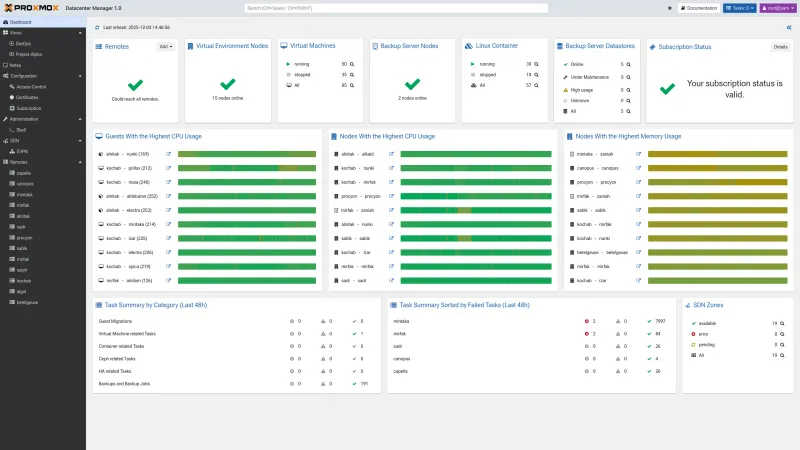 Proxmox Datacenter Manager’s web-based interface provides a unified dashboard of all connected Proxmox clusters, nodes, VMs, and storage. IT administrators can monitor health, performance, and tasks across data centers at a glance.
PDM’s architecture deliberately avoids becoming a single point of failure: it communicates with each managed “remote” (an independent PVE cluster or PBS server) via APIs and provides an “escape hatch” to each system’s native GUI for detailed configuration. This loosely-coupled design means that if the central PDM server is offline, your individual Proxmox clusters continue operating normally – PDM is an overlay management tool, not a dependency for runtime operation. Written entirely in Rust and compiled to WebAssembly, Proxmox Datacenter Manager emphasizes security and performance. In short, PDM is an official Proxmox solution to “centralize, simplify, and scale” Proxmox-based virtual infrastructure management.
Key Features and Capabilities of PDM
Proxmox Datacenter Manager offers a rich set of features to simplify operations in complex IT environments. Some of its key capabilities include:
-
Centralized Dashboard and Inventory: PDM aggregates all your Proxmox VE clusters, nodes, and PBS instances into a single “cockpit.” Administrators get a structured, unified view of all hosts, virtual machines (VMs), containers, and datastores across locations. A global dashboard highlights the status and health of all connected remotes (e.g., high CPU usage or failed tasks). Powerful search functionality lets you quickly find specific resources, even in large-scale deployments.
-
Multi-Cluster Management & Live Migration: From the PDM interface, IT staff can manage virtual workloads at scale without logging into each cluster’s GUI. You can start, stop, reboot, or shut down VMs and containers across any connected node. A headline feature is cross-cluster live migration – PDM enables moving running VMs between independent PVE clusters with zero downtime. This facilitates load balancing and planned maintenance across data centers, enhancing high availability without requiring the clusters to be in the same PVE cluster network.
-
Deep Integration with Proxmox Backup Server: PDM treats Proxmox Backup Server as another remote, providing a unified view of the backup infrastructure within a single dashboard. It can display all PBS datastores, backup contents, and RRD graphs for backup utilization and performance across sites. Metrics from PBS instances are integrated into PDM’s central widgets, giving you a single pane of glass for both virtualization and backup metrics. (Support for managing backup jobs via PDM is also on the roadmap, as discussed later.)
-
Custom Views and Delegated Access: Recognizing that different teams may need tailored dashboards, PDM allows you to create Custom Views with flexible layouts and filters. For example, you might create a view focusing on a specific department’s clusters or a subset of critical VMs. These views can be filtered by remotes, resource types, tags, and more, and PDM’s role-based access control lets you delegate view access to users without granting them direct access to the underlying Proxmox servers. This capability simplifies multi-tenant environments and internal permission segregation by ensuring that staff only see and manage what they’re authorized to access.
-
Enhanced Monitoring and Analytics: PDM improves insight into infrastructure usage through consolidated metrics collection and visualization. It gathers performance data (CPU, memory, etc.) from all clusters and displays them via dashboards and historical RRD graphs. By spotting trends in resource consumption across the whole estate, IT managers can detect issues early, optimize VM placement, and plan capacity upgrades more effectively. The task logs from all connected Proxmox systems are also aggregated centrally, simplifying auditing and troubleshooting across the entire infrastructure.
-
Enterprise-Grade Authentication and API Integration: Proxmox Datacenter Manager supports out-of-the-box integration with corporate identity systems. It can integrate with LDAP or Active Directory domains, as well as OpenID Connect single sign-on, for user authentication. This means users can log in to PDM with their existing enterprise credentials, and it supports two-factor authentication (2FA) for added security. PDM also exposes a REST API and supports creating API tokens with fine-grained permissions. This enables external tools or scripts to interface with PDM for automation, or to integrate PDM’s data into other IT monitoring systems.
-
Software-Defined Networking (EVPN) Management: In multi-cluster environments, networking can be complex. PDM includes centralized SDN capabilities using EVPN (Ethernet VPN) to simplify network orchestration across clusters. Administrators can configure virtual networks (VNETs) and EVPN zones that span multiple remote sites from the PDM interface. This makes it easier to set up consistent overlay networks for VMs across sites, without manually configuring each cluster’s network in isolation.
-
Centralized Update and Patch Management: Keeping dozens of hypervisor nodes up to date is challenging. PDM provides a global view of available updates for all connected Proxmox VE and PBS instances. A dedicated Update Management panel shows the status of each node’s package repositories and any pending upgrades or security patches. Even better, PDM lets you trigger updates remotely – you can apply patches to clusters directly from the PDM interface, leveraging its remote shell access to each node. This streamlines the rollout of critical updates across your entire Proxmox estate.
Each of these features has been designed for scale. In internal tests, the Proxmox team has run PDM with over 5,000 remotes (clusters/nodes) and 10,000+ virtual machines, demonstrating that it can handle very large deployments as it matures. The feature set will continue to expand, but even in version 1.0, PDM delivers a comprehensive toolkit for enterprise-grade multi-cluster management.
Why IT Managers and Organizations Need PDM
For IT managers, the value proposition of Proxmox Datacenter Manager lies in solving the challenges of scale, complexity, and efficiency in virtualization operations. Many organizations start with a single Proxmox VE cluster, but as the infrastructure grows – new clusters in other departments, additional data centers, separate instances for testing or different geographical sites – management becomes decentralized and cumbersome. Without PDM, administrators must log in to each Proxmox cluster’s interface separately, making it difficult to maintain a holistic view of resource utilization, performance trends, and ongoing issues. There is also no easy way to migrate workloads between independent clusters, potentially leading to siloed capacity that can’t be optimized.
PDM directly addresses these pain points. Centralizing management allows IT teams to see the “big picture” and make better decisions using complete data rather than guesswork. As Proxmox’s description notes, PDM provides a “single, clear view” of all environments, helping identify trends and opportunities for improvement. For example, an IT manager can quickly identify an underutilized cluster in one site and an overtaxed cluster in another, and then rebalance workloads accordingly – something that would be hard to catch without a unified view.
Another reason organizations need PDM is to reduce operational complexity and overhead. Managing many virtualization islands often requires more staff or more time; by unifying control, PDM allows a given team to oversee a larger infrastructure footprint without linear growth in effort. Proxmox emphasizes that you can “manage more clusters, locations, and customers from a single control plane,” essentially “grow without growing the team.”. This efficiency can translate into significant cost savings and a higher service quality. IT departments can standardize procedures (e.g., patch management and backup monitoring) across all sites using PDM’s centralized tools, rather than maintaining separate processes for each cluster.
Importantly, PDM also helps organizations meet high availability and uptime goals. In scenarios such as data center maintenance or unexpected incidents, the ability to live-migrate VMs across clusters enables workloads to be shifted to a safe state with zero downtime. This makes it easier to meet Service Level Agreements (SLAs) and avoid outages that could impact the business. An IT manager responsible for uptime will appreciate how PDM’s cross-site migration and consolidated alerting reduce the risk of critical issues being missed. In short, PDM is needed to ensure reliability at scale; it provides tools to keep services running smoothly as the environment becomes more complex.
Security and compliance concerns also drive the need for PDM. In highly regulated industries, having centralized Role-Based Access Control (RBAC) and audit logs across the entire virtual infrastructure streamlines compliance audits. PDM’s integration with centralized identity (AD/LDAP) and a granular permission model means an IT organization can enforce least-privilege access and clearly separate duties across different clusters. All actions (such as VM migrations or node reboots) can be traced in the central logs. This not only improves security but also simplifies demonstrating compliance with standards or internal policies – another key concern for IT decision-makers.
In summary, IT managers should consider PDM when:
-
They have multiple Proxmox environments (production, DR site, dev/test, etc.) and want one unified management portal.
-
They need to improve operational efficiency and do more with the same or smaller team.
-
Uptime, business continuity, and optimal resource utilization are hard to achieve with fragmented management.
-
They want to enforce consistent security and governance across all virtual infrastructure.
By deploying Proxmox Datacenter Manager, organizations can proactively address these needs, turning a collection of separate Proxmox servers into a cohesive, centrally-governed cloud.
Typical Use Cases and Deployment Scenarios
Proxmox Datacenter Manager is most beneficial in scenarios where virtualization infrastructure spans multiple servers, clusters, or locations. Below are some typical use cases and deployment scenarios for PDM:
-
Large Enterprises with Multiple Data Centers: Consider a company running Proxmox clusters across several on-premises data centers (e.g., one cluster per regional site). PDM can be deployed as a central management server (either on a dedicated VM or a small dedicated appliance) that connects to each cluster. In this scenario, the IT operations team at headquarters can monitor all data centers in real time, perform cross-site VM migrations for load balancing, and roll out updates to every node from one interface. This ensures global visibility and control over a widely distributed Proxmox environment.
-
Managed Service Providers (MSPs) and Hosting Companies: Service providers often maintain separate Proxmox environments for different clients or tenant projects. With PDM, an MSP can manage hundreds of Proxmox instances for different customers in one place (using PDM’s Custom Views to segment by customer or project). The central control plane allows the MSP to offer seamless operations – for example, migrating a client’s workload from one cluster to another during maintenance – without requiring the client to do anything. It also reduces the overhead of managing each client cluster individually. This “single pane of glass” approach is key for MSPs to scale up their services efficiently while keeping staffing lean.
-
Organizations with Edge Sites or Branch Offices: Some companies deploy Proxmox servers across multiple branch locations (e.g., retail stores, factories, or remote offices) in addition to their main data center. PDM can connect these disparate Proxmox nodes/mini-clusters to the central console. IT admins at HQ can then monitor the health of each remote site’s server, push updates, and ensure backups are running, all remotely. Essentially, PDM turns a potentially sprawling edge deployment into a centrally managed fleet. This is valuable for ensuring consistency and enforcing policies across sites, and for troubleshooting issues at remote locations without sending IT staff on-site.
-
High-Availability and Disaster Recovery Setups: PDM is useful when organizations operate separate Proxmox clusters for HA or DR purposes. For instance, a business might have a primary PVE cluster in one data center and a secondary cluster in another for disaster recovery. With PDM, failover and recovery workflows are simplified – you can live-migrate critical VMs from the primary to the secondary cluster proactively if an impending outage is detected. In a disaster scenario, PDM’s overview helps quickly identify which site is affected and relocate workloads accordingly. Additionally, because PDM can show backup server data, it complements DR planning by ensuring backups are visible and restorable from any location.
From a deployment perspective, Proxmox Datacenter Manager is installed as a standalone server (similar to installing Proxmox VE). Proxmox provides an official ISO installer to set up PDM on a bare-metal server or virtual machine. Under the hood, PDM is based on Debian Linux (Debian 13 “Trixie” for version 1.0) and uses a modern 6.x Linux kernel, so it can run on standard x86_64 hardware. For evaluation or smaller environments, you might deploy PDM on a modest VM; for large environments, a more robust server is recommended. After installation, each Proxmox VE cluster or node (and PBS server) is added to PDM as a “remote” by supplying its API credentials. This enrollment is performed securely and does not require modifying the clusters. PDM connects over HTTPS (port 443) using the standard Proxmox API, so the integration is lightweight and non-intrusive. Once added, these remotes continuously feed data into PDM’s database, and administrators can perform actions on them via PDM, which is relayed via the API.
It’s worth noting that PDM is currently a single-node application (it doesn’t form a cluster). In critical deployments, some organizations may choose to run a secondary PDM instance as a standby for redundancy. While PDM doesn’t yet have an automatic HA mode, the documentation suggests that running two instances in parallel (pointing at the same remotes) is possible; the trade-off is double data collection overhead, but it provides an immediate backup management node if one goes down. The Proxmox team is evaluating a formal active-standby architecture for PDM.
In summary, any organization managing multiple Proxmox VE or PBS systems can benefit from Proxmox Datacenter Manager. Whether it’s to streamline a growing virtual infrastructure, provide a centralized service to customers, or coordinate IT operations across locations, PDM is designed to make these scenarios more efficient and manageable.
Integration with Other Proxmox Products
One of the strengths of Proxmox Datacenter Manager is that it’s built for the Proxmox ecosystem from the ground up. It natively integrates with Proxmox’s core platforms to create a cohesive management experience:
-
Proxmox Virtual Environment (PVE): PDM was primarily conceived as a multi-cluster manager for Proxmox VE hypervisors. It connects to any number of PVE hosts or clusters (running PVE version 8.0 or higher) and treats each as a remote that it monitors and controls. All typical PVE resources – nodes, VMs, containers, storage volumes, etc. – are represented in PDM’s UI. Crucially, PDM’s integration with PVE allows live migration across clusters, which is not possible with PVE alone (normally, live migration requires nodes to be in the same cluster). PDM accomplishes this by orchestrating migrations via the PVE APIs and by transferring data between clusters, all handled seamlessly through its interface. Additionally, PDM can launch a direct web console or shell on a PVE node when deeper configuration or troubleshooting is needed, allowing you to access the familiar PVE interface from within PDM. PDM’s design does not replace PVE’s management layer - instead, it sits on top and coordinates multiple PVE instances. This means you can still use each cluster’s web GUI for local tasks, but PDM gives you broad control that spans clusters.
-
Proxmox Backup Server (PBS): Starting with the stable 1.0 release, PDM added official support for managing Proxmox Backup Server remotes. A PBS remote in PDM will show up with its datastores and backup contents visible, similar to how a PVE remote shows its VMs. The PDM dashboard and graphs incorporate PBS metrics (like storage utilization, backup throughput) to provide a central view of backup status across sites. Administrators can thus track all backup targets and verify that backups run on schedule without logging into each PBS web interface individually. In the future, the integration is expected to deepen – for example, the roadmap includes managing backup jobs and replication through PDM. Even today, PDM can leverage its remote shell feature to let you trigger backup operations or updates on a PBS node from the central UI. For organizations using Proxmox for both virtualization and backup, this unified approach offers significant convenience.
-
Planned Integration with Proxmox Mail Gateway (PMG): Proxmox Mail Gateway, the company’s email security appliance, is not yet directly supported in PDM. However, the Proxmox team has indicated that PMG integration is planned for a future release. Since PMG is a separate product domain (email filtering), its integration might require centralized monitoring of mail gateway instances or aggregated email-flow statistics. While details aren’t confirmed, the intent is that eventually PDM could oversee all major Proxmox products in a unified manner. This would make PDM a one-stop control center for virtualization, backup, and email security infrastructure in organizations that use the full Proxmox stack.
-
Other Proxmox Tools: Proxmox has an Offline Mirror tool (for offline package repository mirroring) and other auxiliary services. There is no direct integration for these in PDM as of version 1.0. The focus has been on PVE and PBS which cover the primary infrastructure elements. Future updates may explore how tools like the Offline Mirror could be managed or at least monitored via PDM. The priority, according to Proxmox’s team, was to first stabilize the core functionality for hypervisor and backup management, and then evaluate other products for integration.
Beyond product integration, PDM also integrates well with enterprise IT ecosystems in general. As mentioned, it supports tying into directory services (AD/LDAP) and SSO for identity, as well as providing an API that can be used to integrate Proxmox management into higher-level orchestration systems. For example, an IT department could use scripts or an external ITSM tool to query PDM’s API for capacity statistics or to automate provisioning tasks across clusters. This makes PDM not just a standalone console, but also a potential component in broader infrastructure management workflows.
In summary, Proxmox Datacenter Manager amplifies the capabilities of Proxmox’s existing products by integrating them. The native compatibility and knowledge of PVE/PBS internals mean PDM can implement features (such as cross-cluster VM moves or an aggregated backups view) that would be very hard to replicate with third-party tools. For Proxmox users, adopting PDM is a natural extension that leverages the entire ecosystem’s capabilities.
Benefits to Infrastructure and Operations
Using Proxmox Datacenter Manager yields numerous benefits for an organization’s IT infrastructure and operations. Below, we highlight some of the key benefits and the value they deliver to IT teams and decision-makers:
-
Single Pane of Glass Visibility: With PDM, admins gain a single, clear view of the entire virtual environment rather than piecemeal, cluster-by-cluster monitoring. This holistic insight enables better decision-making – you can spot trends and patterns (e.g., gradual resource saturation, or imbalances in VM distribution) that would be missed otherwise. Ultimately, this helps IT leaders plan capacity and new services based on solid data rather than guesswork.
-
Improved Operational Efficiency: PDM helps simplify daily operations by unifying tools and standardizing workflows. Common tasks such as deploying VMs, applying updates, and collecting logs can be done in one place, saving time. Teams can manage a larger infrastructure without a proportional increase in effort or headcount. This efficiency is crucial for organizations looking to do more with limited IT staff – PDM lets you scale your virtualization footprint without scaling up complexity or team size.
-
Cost Optimization: By providing accurate visibility into resource utilization across clusters, PDM helps identify overprovisioned or under-utilized resources. IT managers can avoid unnecessary hardware spend by reallocating existing capacity more smartly. Proxmox emphasizes that with PDM, you can “avoid overprovisioning, reduce unused capacity, and invest only where it’s needed,” resulting in lower infrastructure costs. In other words, PDM can pay for itself by highlighting consolidation opportunities and preventing waste across the enterprise.
-
Higher Availability and SLA Compliance: PDM’s features improve service uptime and reliability. The ability to do cross-datacenter live migrations means maintenance or incident response can happen with minimal impact – VMs are moved away from troubled hosts or sites seamlessly. This greatly helps meet service-level agreements (SLAs) for availability. By reducing downtime risks (and the associated reputational or financial damage), PDM becomes a strategic asset for meeting business continuity objectives.
-
Streamlined Growth and Scalability: As the business grows, adding new Proxmox clusters or locations is straightforward with PDM. The tool is built to “grow with you” – you can keep attaching new remotes and they slot into the existing central management framework. This means IT can onboard new sites or projects faster, without retooling management processes each time. The confidence to expand into new regions or data centers while remaining organized and in control is a significant benefit for fast-growing companies.
-
Enhanced Compliance and Security Oversight: PDM simplifies compliance by enforcing role-based access control (RBAC) and central audit trails. Instead of managing separate user accounts on dozens of servers, admins can integrate PDM with a central directory and manage permissions centrally. This ensures the principle of least privilege is consistently applied and that, when auditors review, it’s easy to demonstrate who has access to what. Additionally, having a single console enables critical security updates (for both PVE and PBS) to be rolled out quickly to all systems via PDM’s update manager, reducing the window of vulnerability and maintaining a stronger security posture enterprise-wide.
In essence, Proxmox Datacenter Manager brings centralized cloud management to Proxmox users. Organizations that adopt it can expect smoother operations, lower costs through optimized resource utilization, faster issue response, and an IT environment that’s easier to govern and scale. These advantages make PDM an attractive proposition for IT decision-makers who need to ensure their infrastructure is not only robust and scalable but also intelligently and cohesively managed.
Licensing and Support for PDM
Proxmox Datacenter Manager is distributed under the same open-source ethos as other Proxmox products – it is free and licensed under the GNU AGPL v3 (open source). You can download the software and use it without any license fee. However, enterprise support and updates for PDM are tied to Proxmox’s subscription model in a unique way. There is no separate subscription required specifically for PDM – instead, if you have an active Proxmox Enterprise Support subscription for the products you’re managing (e.g., a support subscription on your Proxmox VE clusters or PBS servers), then PDM support and updates are included at no extra cost.
In practice, this means that customers with Basic, Standard, or Premium support subscriptions for their Proxmox VE/Backup servers automatically gain access to the Proxmox Datacenter Manager enterprise repository and technical support channels. For example, if your company has a Proxmox VE cluster covered under a Premium support contract, you can install PDM and use your existing subscription credentials to enable the PDM Enterprise repository (which provides stable updates) and to receive help from Proxmox’s support team for PDM-related issues. No additional license key or purchase is needed for PDM itself. This approach lowers the barrier to adoption for enterprises already invested in Proxmox, as they won’t be “double charged” for adding the datacenter manager.
For users without enterprise subscriptions, PDM can still be used via the no-subscription (community) repository, similar to Proxmox VE. The community edition of PDM has the same functionality, but you would rely on community support (forums, etc.) and you might not get the very latest stable updates as promptly as the enterprise repo. The Proxmox Community Forum is available for all users and is actively moderated by the Proxmox team, so even without a paid subscription, you can seek guidance there. Proxmox also provides a public bug tracker and development mailing lists for open-source collaboration on PDM.
In summary, licensing for PDM is straightforward: the software is open-source and free, and if you’re an enterprise user, your existing Proxmox support subscriptions will cover PDM. It’s a customer-friendly model that encourages users to try PDM and integrate it into their environment. From a budgeting perspective, an IT manager can implement PDM without creating a new line item for licensing; instead, they can leverage the support contracts already in place for Proxmox VE or PBS. And if professional support is needed, Proxmox’s team is available as long as your Proxmox infrastructure has an active subscription. This arrangement reflects Proxmox’s overall philosophy of providing value on top of open-source projects through optional support and services, rather than through licensing fees.
Future Roadmap and Planned Features
Proxmox Datacenter Manager is a relatively new product (the first stable release, 1.0, was released in December 2025), and the Proxmox development team has an ambitious roadmap to further enhance its capabilities. While roadmaps are subject to change, the publicly shared plans give a good sense of where PDM is headed in the near future. Here are some of the notable features and improvements we can expect down the line:
-
Simplified Remote Onboarding: Proxmox plans to make it easier to add new remote hosts (clusters/nodes) to PDM by introducing a “join info” mechanism. Similar to how joining nodes in a PVE cluster works, an API endpoint will securely provide the necessary connection details, so that adding a remote to PDM can be done with minimal manual configuration. This will save time and reduce potential errors when connecting dozens or hundreds of nodes.
-
Expanded Configuration Management: Future versions of PDM will enable you to centrally manage core cluster configurations. Two items explicitly mentioned are backup job management and firewall management via PDM. That means you can create or schedule PBS backup jobs through the PDM interface and monitor their status globally. Likewise, editing Proxmox VE cluster firewall rules (currently cluster-scoped) could be done in PDM, building on the visualization of firewall settings PDM already provides. This shifts PDM toward configuration orchestration rather than just monitoring.
-
Off-site Replication and DR: A planned feature is off-site replication of guests (VMs/CTs) to support disaster recovery scenarios. While PDM already helps with live-migrating running VMs across clusters, this new capability enables scheduled replication of VM data to a remote site for quick recovery in case of a data center outage. It suggests PDM could coordinate periodic VM syncs between sites (possibly leveraging PBS or ZFS replication) to maintain a warm standby for critical workloads.
-
High Availability for PDM: Recognizing that PDM itself could be a single point of management, the team is evaluating an active-standby architecture for PDM servers. The idea is to enable a secondary PDM instance to automatically take over if the primary fails, ensuring the management plane remains highly available. Currently, as noted, you can run two instances in parallel (with some overhead) as a makeshift solution. A formal HA implementation would streamline that and likely keep instances in sync.
-
Integration of Proxmox Mail Gateway: As mentioned, support for Proxmox Mail Gateway (PMG) in PDM is on the roadmap. This will broaden PDM’s scope beyond virtualization and backups, making it a unified console for email security appliances as well. We can expect the integration to support basic monitoring of PMG nodes (e.g., status and email processing stats) and possibly management actions, such as updating or syncing configurations across multiple PMGs.
-
Bulk Operations: A quality-of-life improvement in the pipeline is the ability to perform bulk actions across multiple VMs or containers simultaneously. In a big environment, you might want to start, stop, or migrate dozens of VMs together (for example, powering down a group of test VMs every evening). Future PDM updates will introduce multi-select and bulk execution, making these workflows much more efficient.
-
Notification and Alerting System: The developers plan to integrate a notification and alerting system into PDM. This likely includes standard alerts for things like node offline, high resource usage, or available updates. Moreover, they are considering allowing PDM to act as a notification hub for the managed remotes. In practice, that could mean if a cluster experiences a hardware failure or a backup job fails, PDM could aggregate those alerts and notify administrators (via email or dashboard alerts) centrally. This feature would further solidify PDM as the central monitoring dashboard to which all important events funnel.
-
User Interface Enhancements: Usability is a continuous focus. The roadmap outlines improvements to handling features such as multi-factor authentication on remote probes (so PDM can connect to a remote probe with 2FA enabled), and possibly a unified view of resource pools across clusters. Also, the Custom Views feature will be extended – expect more types of widgets (including interactive control widgets) and more flexible layouts for those custom dashboards. Admins might be able to create multiple tabs in a view or drag and drop additional data types, tailoring PDM even further to their needs.
-
Miscellaneous: Other ideas on the table include extending filtering capabilities with more operators (to better slice and dice the resource data), and refining various aspects of the UI/UX as feedback comes in. Because PDM is open-source, users can also submit feature requests, and Proxmox has encouraged the community to share their needs to help prioritize next steps.
It’s important to note that these roadmap items are goals, not guaranteed promises, as Proxmox makes clear. However, many of the listed features align with efforts to make PDM a more powerful and comprehensive data center management tool. Given Proxmox’s track record of rapid development (PDM went from beta to stable within a year, adding significant features), we can expect to see many of these enhancements in upcoming releases.
For IT managers evaluating PDM, the roadmap is reassuring: it shows that Proxmox is committed to evolving the product and filling any gaps. Features like PMG integration and HA support indicate that PDM is intended to become a long-term strategic platform for managing all aspects of Proxmox deployments. Keeping an eye on the official release notes and community forum will provide updates on when these new features roll out. The first stable release is just the beginning, and PDM’s capabilities are set to grow significantly in the near future.
Conclusion
Proxmox Datacenter Manager represents a significant step forward for organizations running Proxmox Virtual Environment and related services at scale. It brings the convenience and oversight of a centralized management console – akin to what proprietary virtualization stacks have offered – to the Proxmox ecosystem, all while remaining open-source and accessible. For IT decision-makers, PDM offers a compelling mix of operational efficiency, better insight, and control over complexity. By deploying PDM, enterprises can centralize their Proxmox clusters under one roof, simplify routine tasks and updates, and ensure that as their infrastructure scales, it remains manageable and cost-effective.
In today’s multi-datacenter, distributed IT environment, a unified management layer is increasingly essential. Proxmox Datacenter Manager fills that role with a tool built specifically for Proxmox users’ needs, leveraging familiar technologies (web interface, REST APIs, etc.) in new ways. The tight integration with Proxmox VE and Backup Server enables quick adoption and immediate benefits in visibility and control. With Proxmox including PDM in its enterprise support model, the path to implementation is straightforward for those already invested in Proxmox subscriptions.
To recap, Proxmox Datacenter Manager is about centralization, simplification, and scalability for Proxmox infrastructures. It’s an enabler for IT teams to manage growing virtual environments smartly – with less overhead, greater confidence in meeting SLAs, and more actionable intelligence about their operations. As the product matures, with upcoming features such as broader integrations and advanced automation, its value proposition will only strengthen. For any organization that relies on Proxmox and manages multiple servers or clusters, PDM is certainly worth a close look as a centralized data center management solution to drive efficiency and success in your IT operations.