

 Running your own Bitcoin node is one of those projects that sounds simple until you start shopping for hardware. You know you want to verify transactions yourself instead of trusting someone else's server. Then you open a few forum threads, and suddenly everyone's arguing about NVMe drives, dbcache settings, and whether 1 TB is "enough."
Things might be challenging at the beginning, but the good news is that most of that confusion goes away once you answer one major question. Are you running a full node or a pruned node?
Both use the same software, Bitcoin Core, but they put very different demands on a server. So let's walk through what each type does, what specs it needs in 2026, and why a dedicated server is usually the most comfortable place to run either one.
Full Node vs. Pruned Node: What's the Difference?
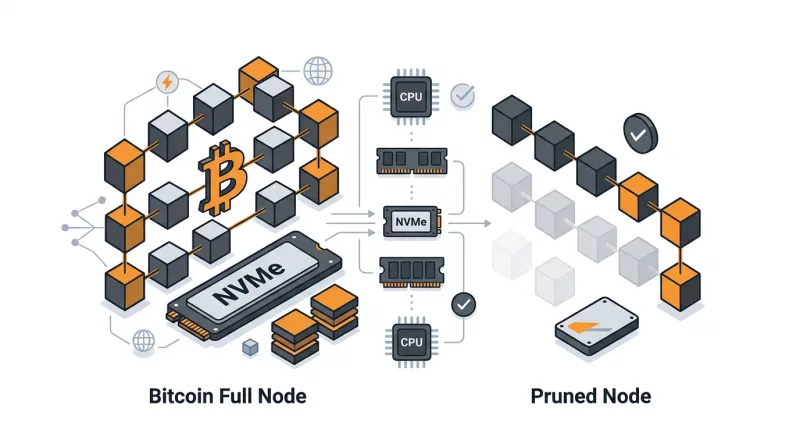
The first thing we need to clear up here is that a pruned node isn't a "lite" version of Bitcoin. It downloads every block back to 2009 and checks every signature and rule, exactly like a full node. From a security standpoint, you get the same thing.
The real difference is what each node does with the data after checking it.
A full (archival) node keeps every block it has ever verified. Bitcoin’s blockchain was about 759 GB in early August 2026 and grows by roughly 0.25 GB a day, which puts it at around 770 GB today. Holding on to all that history lets a full node do three things a pruned node can't:
-
Send old blocks to new nodes that are still syncing
-
Keep a full transaction index
-
Power tools like block explorers and Electrum servers
A pruned node takes the opposite approach. Once it has checked a block, it deletes it and keeps the most recent blocks and the chainstate, which is simply the list of coins that haven't been spent yet.
What Specs Does a Full Bitcoin Node Need?
If you check the Bitcoin Core requirements page, you'll see it asks for surprisingly little: 750 GB of disk space and 2 GB of RAM. That'll get a node running, sure. But if you want it running smoothly for the next few years, here's what we'd plan for.
-
Storage: 2 TB NVMe SSD: Start with the roughly 770 GB chain, then add around 11 GB for the chainstate and about 35 GB more if you switch on txindex. Running an Electrum server or block explorer? Those bring their own indexes too. And since the chain grows by around 70–80 GB a year, a 1 TB drive fills up fast. Drive type matters as much as size. The initial sync throws a huge number of small reads and writes at the disk, and on slow storage, it can drag on for days instead of hours.
-
RAM: 16 GB: Bitcoin Core uses spare memory as a cache while it builds the chainstate (that's the dbcache setting). The bigger the cache, the less it writes to disk, and the faster you sync. With 16 GB, you can be generous with the cache and still have room for an indexer or a Lightning node.
-
CPU: 4–8 Modern Cores: During the first sync, Bitcoin Core checks signatures on several cores at once, so extra cores really do speed things up. After that, the CPU is mostly idle.
-
Bandwidth: A 1 Gbps Port with Plenty of Traffic: Plan for a one-off download of around 740 GB, followed by at least 150 GB of upload every month. If your node accepts incoming connections, and a healthy one should, that upload can get to the terabytes. An unmetered or high-allowance plan saves you a lot of worry.
What Specs Does a Pruned Bitcoin Node Need?
A pruned node is much easier on hardware, though there's one catch that trips up plenty of people.
-
Storage: 250–500 GB NVMe SSD. With the minimum prune setting, the whole node fits in about 12 GB. That doesn't mean you should grab the smallest drive available, though. The operating system and logs need space, and you might add a Lightning node later. It's also worth keeping a bigger buffer of recent blocks: prune=50000 holds roughly three months of blocks in about 60 GB, which makes life much easier if something goes wrong.
-
RAM and CPU: 4–8 GB and 2–4 cores. That's plenty for Bitcoin Core with a sensible cache and enough to get through the initial sync in a reasonable time.
-
Bandwidth: here's the catch. Pruning saves disk space, not downloads. Your node still has to fetch and check the entire chain once, so you'll pull in around 740 GB on day one. After that, things calm down, because you're not serving old blocks to other nodes.
It's also good to know the limits before you commit. A pruned node can't run txindex, a block explorer, or an Electrum server. And if you ever need to restore an old wallet that requires a deep rescan, you'll usually be resyncing from scratch.
Full node vs. pruned node: a quick side-by-side
Here's how the two stack up at a glance:
|
Criteria |
Full (archival) node |
Pruned node |
|
Disk used today |
~770 GB (~820 GB with txindex) |
~12–60 GB |
|
Recommended storage |
2 TB NVMe SSD |
250–500 GB NVMe SSD |
|
RAM |
16 GB |
4–8 GB |
|
CPU |
4–8 cores |
2–4 cores |
|
One-time initial download |
~740 GB |
~740 GB |
|
Ongoing upload |
150 GB+/month, often far more |
Low |
|
Serves old blocks, txindex, explorers |
Yes |
No |
Why a Dedicated Server Makes More Sense Than a VPS or Home Setup
A pruned node can run on a decent VPS, and for a personal wallet a Bitcoin VPS is a perfectly reasonable starting point. In the long run, however, a dedicated server has some real advantages. Some of them include:
-
Your Disk is Yours Alone. The initial sync is basically one long stress test for storage. On a VPS, you share the physical disks with other customers, so a busy neighbor can slow your sync to a crawl. On a dedicated server, nobody else touches your NVMe drive.
-
Storage Doesn't Get Pricey: Big disk allocations on VPS plans add up quickly. A dedicated server with 2 TB of NVMe gives you years of room to grow at a predictable monthly price.
-
No Bandwidth Surprises. Even Bitcoin Core's own documentation warns that some home internet providers charge for extra upload or cut off heavy users entirely. A data center connection with a generous traffic allowance removes that problem.
-
It Stays Online and Stays Private. A node only helps you when it's running. A Bitcoin dedicated server sits in a professional data center around the clock, physically separate from other customers, and you can encrypt the entire disk. That's especially valuable if your node runs alongside a wallet or payment system.
Still on the fence? Our guide on who actually needs a dedicated server compares blockchain nodes with other demanding workloads.
So, Which One is Right for You?
If you mainly want to verify your own transactions, back a personal wallet, or run a small Lightning setup, a pruned node will do the job nicely. It's cheaper, lighter, and every bit as secure for that kind of use.
If you're planning to build on top of Bitcoin, say a block explorer, an Electrum server, payment processing, or analytics that rely on the full transaction history, you'll want a full node. It's also the best way to give something back to the network, since you'll be serving blocks to new nodes.
Either way, Bacloud's blockchain server hosting and crypto dedicated servers can be set up with the exact CPU, RAM, and NVMe storage you need, and you can pay in Bitcoin if you like. And if your node is going to operate alongside a wallet, our step-by-step guide to setting up a private crypto wallet server is a great next read.