

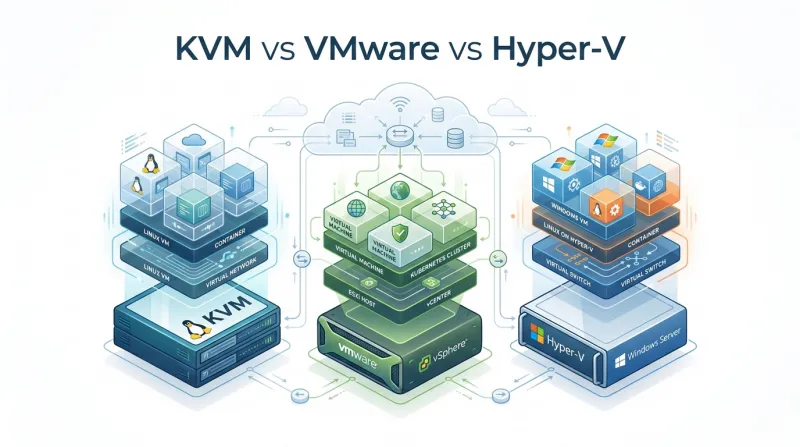
Do you need KVM’s low cost? Would VMware’s enterprise tools justify its license price? Or would Hyper-V be a better fit for the Windows systems you already use? This article compares the three in greater detail to give a clear idea of which platform best matches your applications and your team’s skills.
What is KVM?
KVM stands for Kernel-based Virtual Machine. It is a virtualization technique built directly into the Linux kernel and turns a Linux server into a host for virtual machines. Each VM has its own operating system and virtual hardware.
KVM can run:
-
Linux and Windows
-
BSD and Solaris
-
macOS with some restrictions
The server processor must support Intel VT-x or AMD-V. KVM was added to the main Linux kernel in 2007 and now supports platforms such as Proxmox and many cloud services. It has no separate hypervisor license fee.
The trade-off is administration. Teams often need Linux skills or a tool such as Proxmox to manage VMs through a web interface.
What is VMware?
VMware is a technology company that provides cloud computing and virtualization software, enabling multiple virtual machines to run on a single physical computer.
VMware develops commercial software for running virtual machines in business and data center environments. Its products work with both Windows and Linux, so companies can run different operating systems on the same physical hosts.
VMware is known for its early work in x86 virtualization. Its main hypervisor is ESXi, which runs directly on server hardware. VMware vSphere adds management and data center features on top of ESXi.
Key components include:-
-
ESXi :- Runs virtual machines on physical servers.
-
vCenter :- Provides one console for managing ESXi hosts and VMs.
-
vMotion :- Moves a running VM from one host to another.
-
vSphere HA :- Restarts VMs on another host after a server failure.
-
vSAN :- Combines storage from several hosts into one shared system.
-
Site Recovery Manager :- Helps coordinate VM recovery after a serious outage.
This makes VMware more than a single hypervisor. It is a wider virtualization platform for managing servers, storage, migration, and disaster recovery.
The software is mature and widely used. Licensing is expensive, and large installations usually need administrators with VMware experience.
What is Hyper-V?
If your company already uses Microsoft software, Hyper-V may already be available in your Windows setup. Microsoft introduced it in Windows Server 2008. It is also included with the Pro and Enterprise editions of Windows 8, Windows 10, and Windows 11.
Once Hyper-V is enabled, a single physical computer can run multiple VMs. Each VM gets virtual CPU cores and a set amount of memory. Its virtual disk stores the operating system and installed applications. A virtual switch handles network access for the VM.
Common uses include:
-
Testing software on different Windows versions
-
Replacing several physical servers with one host
-
Creating development environments
-
Running business applications
Hyper-V works with Windows Server and Active Directory. If the business already owns the required Windows licenses, Hyper-V can be a sensible option.
KVM vs VMware vs Hyper-V: Key Differences
All three hypervisors can run multiple VMs on a single physical server. KVM fits Linux environments. VMware targets enterprise data centers. Hyper-V works naturally with Windows Server. Let’s explore the key differences between them.
Performance
KVM tends to stay close to bare-metal speed on Linux hosts. The kernel handles CPU scheduling. QEMU takes care of the virtual hardware. Installing VirtIO inside the virtual machine avoids much of the slower emulation used for virtual disks and network cards. CPU pinning and huge pages can help with workloads that need steady response times.
VMware ESXi handles mixed Windows and Linux environments well. Storage-heavy VMs may perform better with vSAN. That depends on the server disks and storage network. Poor storage design can remove that advantage.
Hyper-V is usually strongest with Windows. VMBus connects them to synthetic devices rather than relying solely on emulated hardware. Linux VMs need the correct integration drivers.
A slow VM is not always a hypervisor problem. Storage latency may be the cause. NUMA placement matters on larger servers. Memory pressure and too many virtual CPUs assigned to one host can also reduce performance.
Architecture
KVM, VMware, and Hyper-V all need processor support such as Intel VT-x or AMD-V. The main difference is what happens between the physical server and the guest VM.
KVM is built into the Linux kernel. QEMU supplies the virtual hardware. Libvirt can handle VM creation and administration. During troubleshooting, the administrator may need to inspect kernel settings, QEMU processes, and libvirt connections.
VMware ESXi runs directly on the physical server. It uses its own kernel and hardware drivers. Administrators manage the host through ESXi and vCenter. Storage is usually organized through datastores, while virtual switches handle VM networking.
Hyper-V uses a root environment to manage hardware access. VMs run in child environments and communicate with the root through VMBus. This brings Hyper-V administration close to Windows Server. Here, PowerShell and Failover Clustering are common tools for managing the environment.
Security
KVM can use standard Linux security controls, including SELinux, AppArmor, seccomp, and cgroups. These controls restrict what a virtual machine process can access and help limit damage if a guest is compromised.
VMware provides controls for virtual switches, administrator roles, VM encryption, Secure Boot, and virtual Trusted Platform Modules. Its security features are usually managed through vCenter and the wider VMware product family.
Hyper-V connects with Windows security features such as Shielded VMs, Secure Boot, virtual TPM, and Host Guardian Service. These tools are useful for protected Windows workloads and regulated environments.
A secure hypervisor still needs careful administration. Weak passwords, unpatched hosts, exposed management interfaces, and poorly protected backups can create problems on any platform.
Licensing and Cost
KVM has no separate hypervisor license. The bill may instead include Linux engineers, commercial management software, hardware, monitoring, backup storage, and vendor support.
Hyper-V is included with suitable Windows Server licensing. This can make it affordable for a Microsoft-focused business, although Windows Server, System Center, SQL Server, and Azure services can raise the final cost.
VMware has traditionally offered the broadest enterprise feature set, but it also carries the highest licensing cost in many deployments. Subscription bundles can increase the price for companies that need only a small number of features.
The cheapest license does not always produce the lowest total cost. Staff skills, migration work, backup software, and daily administration also belong in the calculation.
Scalability
KVM works well when a hosting company needs to add physical nodes and create large numbers of VMs through an API. Linux-based cloud platforms often build their own scheduler and management system around KVM.
VMware provides mature cluster tools for balancing CPU and memory use. The Distributed Resource Scheduler can move workloads between hosts as resource demand changes.
Hyper-V scales well across Windows Server clusters. It becomes a less obvious choice when the environment includes many tenants, multiple operating systems, and numerous custom management requirements.
The storage design matters at scale. Shared storage, distributed storage, or storage replication must be planned in conjunction with the hypervisor.
Backup and Disaster Recovery
VMware has a large backup ecosystem built around vSphere APIs. Many products can use Changed Block Tracking to copy only blocks that changed since the previous backup.
Hyper-V works with Microsoft-focused backup products and includes Hyper-V Replica for keeping a copy of a VM on another host or site.
KVM provides snapshots and live migration, but the backup process depends more heavily on the chosen management and storage tools. Proxmox Backup Server, Veeam, and storage-level replication are common choices.
Ease of Deployment
Hyper-V is a familiar option for a Windows Server team. An administrator can create a test VM in Hyper-V Manager on a Windows machine. In a larger setup, Windows Admin Center or PowerShell handles most routine tasks. System Center is used in some enterprise environments.
KVM takes more assembly. The hypervisor is built into the Linux kernel, so administrators typically add QEMU for virtual hardware and libvirt for VM control. Proxmox or oVirt can provide a web interface. The setup amount depends on the management tool selected.
With VMware, ESXi is installed on the physical hosts first. vCenter then brings those hosts under one management console. Before production use, the team must configure datastores and virtual switches. Licensing, clusters, and backup connections also need attention.
Support for Automation
KVM fits well with Infrastructure as Code. Libvirt exposes an API, and tools such as Terraform and Ansible can create and configure VMs without manual work.
For Hyper-V, PowerShell is the main automation tool. Administrators can script VM creation and assign memory without using Hyper-V Manager. The same scripts can configure virtual switches and storage. PowerShell also handles tasks on Failover Clusters. Windows Admin Center and System Center provide graphical controls for teams that prefer policy-based administration.
VMware also has mature APIs, PowerCLI, Terraform providers, and automation tools. The available functions depend on the vSphere products and licenses in use.
Migration
All three support live migration when the hosts, CPUs, networks, and storage are compatible.
VMware uses vMotion to run VMs and Storage vMotion to move their virtual disks.
Hyper-V uses Live Migration within Windows Server clusters.
KVM normally uses libvirt and shared or replicated storage.
Virtualization Capabilities
KVM can host Linux, Windows, BSD, and Solaris. QEMU supplies the virtual hardware for each VM. VirtIO drivers handle disk and network traffic with less overhead than emulated devices.
VMware is built with larger data centers in mind. DRS can move a VM to another host when the current host becomes busy. vSAN uses storage from multiple servers as one shared system. NSX manages virtual networks and security policies. Fault Tolerance keeps a second copy of a running VM available if the main VM stops.
Hyper-V includes Dynamic Memory for adjusting RAM based on demand. It uses VHDX files for virtual disks and provides virtual switches for network connections. Checkpoints capture a VM’s earlier state. VM Replica keeps another copy on a different host. These tools suit Windows Server environments.
Cloud Support
KVM is common in VPS hosting, OpenStack, private clouds, and many cloud-native systems. Its open design suits providers that want to build their own control plane.
VMware is common in private data centers and hybrid cloud projects.
Hyper-V fits Azure-connected environments, Azure Stack deployments, and businesses built around Windows Server.
Centralized Management
VMware vCenter provides a single console for hosts, clusters, datastores, networks, permissions, and VM operations.
Hyper-V management uses Windows Admin Center, PowerShell, and System Center.
KVM management depends on the selected tool, with Proxmox and oVirt offering web interfaces over the underlying Linux and libvirt stack.
High Availability
VMware provides cluster recovery through vSphere High Availability. If an ESXi host fails, the affected VMs can restart on another host. DRS distributes VMs across the cluster. Fault Tolerance keeps a second VM running alongside the primary VM.
Hyper-V handles host failures through Failover Clustering. Live Migration moves a running VM before planned maintenance. VM Replica keeps a copy on another server for recovery after a failure.
KVM can provide high availability through tools such as Proxmox or Pacemaker. Shared storage keeps VM disks available from more than one host. Fencing prevents a failed host from accessing a VM after another host takes control. KVM offers flexibility, but the administrator must design and configure more of the recovery system than with VMware or Hyper-V.
Run Your VMs with BaCloud
If you want to try KVM without building your own server, you can start with a Linux or Windows VPS using NVMe storage.
Need more consistent resources later? BaCloud’s VDS plans give you dedicated capacity. For larger setups, you can rent a dedicated server with Proxmox and Proxmox Backup Server. SolusVM makes basic VM management easier. BaCloud also has server locations in Lithuania, the Netherlands, the UK, and the USA. Start your next virtual machine with a BaCloud VPS.